
Here's the server: mxserver-2009-05-05.zip
The Windows and Linux servers are both in the zip file.
mxserver-2009-05-05
mxserver-2009-05-05
Josh Vanderhoof
Sole Proprietor
jlv@mxsimulator.com
If you email, put "MX Simulator" in the subject to make sure it gets through my spam filter.
Sole Proprietor
jlv@mxsimulator.com
If you email, put "MX Simulator" in the subject to make sure it gets through my spam filter.
Re: mxserver-2009-05-05
And before someone asks, no, you do not need to download this. This is just for people who are going to host their own races
Damn, I've gone over my download limit for the month, so I won't be able to try this till Saturday
Damn, I've gone over my download limit for the month, so I won't be able to try this till Saturday

Re: mxserver-2009-05-05
Yeah, 35 gig on peak, 35 off.

Re: mxserver-2009-05-05
hmmm this is confusing, i have made a text document and i ran the mxserver thing and i dont think it worked/
do you save it as --args-file serverargs.txt into the folder? then run the mxserver thing?
do you save it as --args-file serverargs.txt into the folder? then run the mxserver thing?
My photography work
www.mikeowenphotographer.com
www.mikeowenphotographer.com
Re: mxserver-2009-05-05
No, you save a file with stuff mentioned as serverargs.txt. You put this file, and the necessary trackinfo files into the same folder. Make a new file, and make it have the line
mxserver.exe --args-file serverargs.txt
in it. Save it as whatever.bat. Run the bat file. If the black box stays open, then it 'should' be working. When I try to connect to it though, I just get WSAECONNRESET or whatever it says. I'm pretty sure you have to connect to whatever your IP address is.
mxserver.exe --args-file serverargs.txt
in it. Save it as whatever.bat. Run the bat file. If the black box stays open, then it 'should' be working. When I try to connect to it though, I just get WSAECONNRESET or whatever it says. I'm pretty sure you have to connect to whatever your IP address is.
Re: mxserver-2009-05-05
Dam i think im neally there...
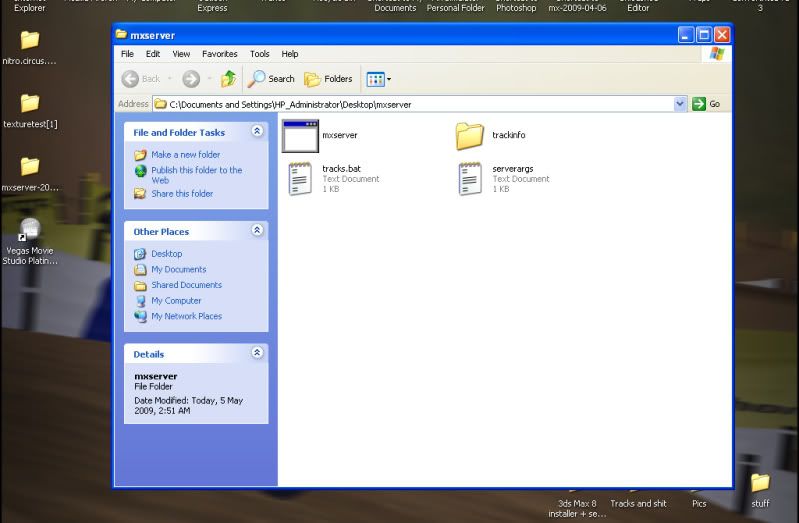
Trackinfo Contains
WFOMX.trackinfo
smithtown.trackinfo
Anaheim.trackinfo
mxon.trackinfo
objects.trackinfo
oldgoldberry.trackinfo
serverargs Contains
--port 19804
--max-clients 15
--password mxsim
--greeting "Welcome to Mikeys Server!!!!"
--ban-file bans.txt
--results-file results.txt
--track-interval 15
--laps 5
WFOMX.trackinfo
smithtown.trackinfo
Anaheim.trackinfo
mxon.trackinfo
objects.trackinfo
oldgoldberry.trackinfo
tracks.bat Contains
mxserver --args-file serverargs.txt
I hope that help's.
*EDIT* when i click on the mxserver thing it comes up with a black box saying "No Tracks Spesafied"
Trackinfo Contains
WFOMX.trackinfo
smithtown.trackinfo
Anaheim.trackinfo
mxon.trackinfo
objects.trackinfo
oldgoldberry.trackinfo
serverargs Contains
--port 19804
--max-clients 15
--password mxsim
--greeting "Welcome to Mikeys Server!!!!"
--ban-file bans.txt
--results-file results.txt
--track-interval 15
--laps 5
WFOMX.trackinfo
smithtown.trackinfo
Anaheim.trackinfo
mxon.trackinfo
objects.trackinfo
oldgoldberry.trackinfo
tracks.bat Contains
mxserver --args-file serverargs.txt
I hope that help's.
*EDIT* when i click on the mxserver thing it comes up with a black box saying "No Tracks Spesafied"
My photography work
www.mikeowenphotographer.com
www.mikeowenphotographer.com
Re: mxserver-2009-05-05
1) Your tracks.bat is actually tracks.bat.txt. Open it up in a text editor and save it as tracks.bat. It should have an icon with a gear in it.
2) You need to run tracks.bat.
3) You need to get the trackinfo files that you want your server to run, into the same folder as mxserver.exe. Right now they are in a subfolder.
2) You need to run tracks.bat.
3) You need to get the trackinfo files that you want your server to run, into the same folder as mxserver.exe. Right now they are in a subfolder.
Re: mxserver-2009-05-05
Do you know your IP address?
Re: mxserver-2009-05-05
Ok DJ i done those and then i got this:
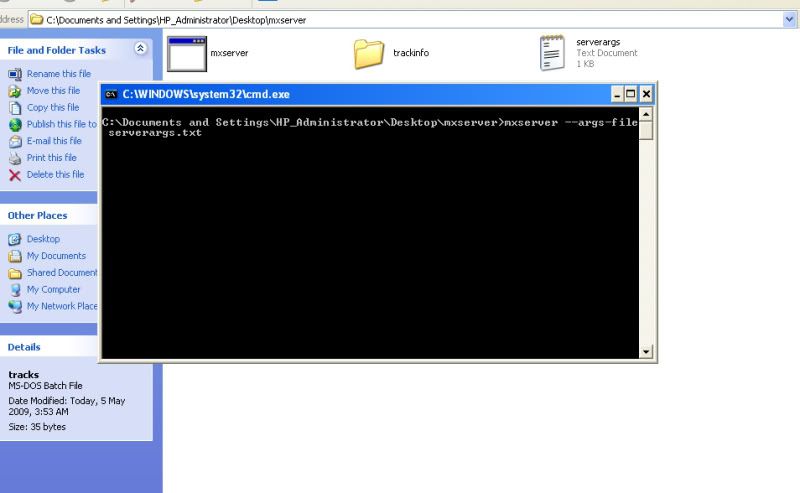
But there is the subfolder there with nothing in it atm because i can not delet...
But then i went into the game and put in 19805 witch is my server number its it said "Can not resolve adresse"
But there is the subfolder there with nothing in it atm because i can not delet...
But then i went into the game and put in 19805 witch is my server number its it said "Can not resolve adresse"
My photography work
www.mikeowenphotographer.com
www.mikeowenphotographer.com
Re: mxserver-2009-05-05
Yeah give up. Neither me or Nick can get ours to work. Just wait and see what JLV has to say
Re: mxserver-2009-05-05
ok, but just a few general questinons...
there can not be more then one of the same server numbers? like only one server can be 19805?
with the .trackinfo there are the track folders in the persanal folder, could i have any track that has been relesed in my server?
there can not be more then one of the same server numbers? like only one server can be 19805?
with the .trackinfo there are the track folders in the persanal folder, could i have any track that has been relesed in my server?
My photography work
www.mikeowenphotographer.com
www.mikeowenphotographer.com